
LCD 16×2 8 bit communication with microcontroller

Circuit
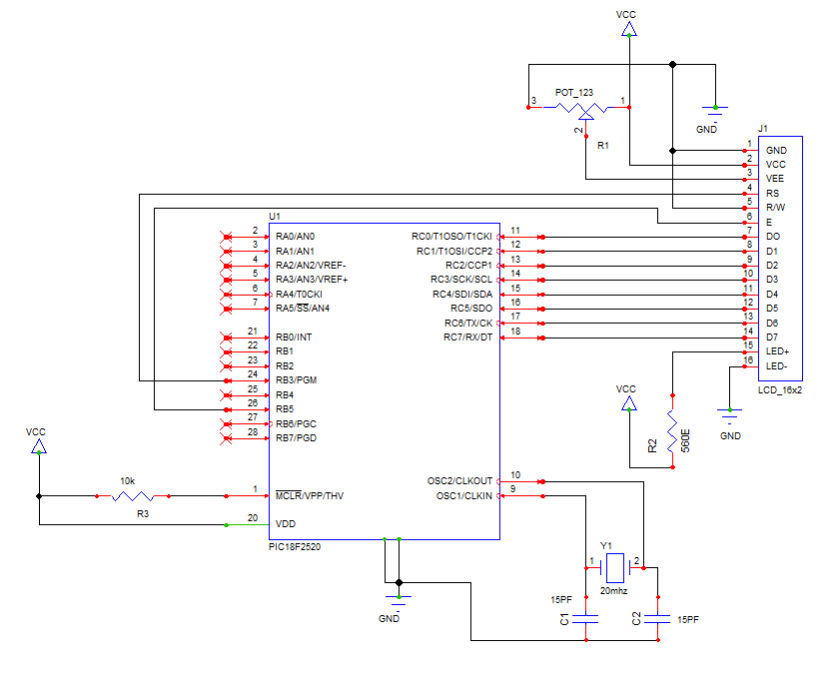
These codes are
according PIC 18f series controller and c18 compiler. You
can use
these codes for any other controller with few modifications. configured
it
pacific resister bits in IDE so you can write configuration codes with
these
codes or configure in IDE. It’s your choice. I am using 20Mhz external crystal
and 10ms delay function according 20Mhz frequency.
CODES
#include <p18f2520.h>
#define RS_PIN PORTBbits.RB3 /* PORT for LCD RS_Pin */
#define E_PIN PORTBbits.RB5 /* PORT for LCD E_Pin */
#define DATA_PORT PORTC
#define TRIS_DATA_PORT TRISC
//————————————————————————–
void LCD_Init(void);
void Str_LCD( const rom char *buffer);
void Chr_LCD(char data);
void clrscr(void);
void Move_Corsor( char Line, char Pos);
//————————————————————————–
void Start_Display(void);
void Refresh_Display(void);
void Time_10ms(void);
void main()
{
TRISB = 0x00;
TRISC = 0x00;
T0CON = 0x06;
LCD_Init();
while(1)
{
Start_Display();
Refresh_Display();
}
}
//————————————————————————-
void Time_10ms()
{
TMR0H = 0xFE;
TMR0L = 0x7A;
T0CONbits.TMR0ON = 1;
while(INTCONbits.TMR0IF == 0);
T0CONbits.TMR0ON = 0;
INTCONbits.TMR0IF = 0;
}
void LCD_Init()
{
RS_PIN = 0; //LCD instructions (RS) pin no. 4
Chr_LCD(0x38); //LCD 8 Bit Data
Chr_LCD(0x01); //LCD clear
Chr_LCD(0x0C); //LCD diplay on cursor not blinking
Chr_LCD(0x80); //LCD cursor Pos. begain
RS_PIN = 1; //LCD DATA (RS) pin no. 4
}
void Str_LCD( const rom char *buffer)
{
while(*buffer) // Write data to LCD up to null
{
Chr_LCD(*buffer); // Write character to LCD
buffer++; // Increment buffer
}
}
void Chr_LCD(char data)
{
DATA_PORT = data;
E_PIN = 1;
Time_10ms();
Time_10ms();
E_PIN = 0;
Time_10ms();
Time_10ms();
}
void clrscr(void)
{
RS_PIN = 0;
Chr_LCD(0x01);
Chr_LCD(0x80);
RS_PIN = 1;
}
void Move_Corsor( char Line, char Pos)
{
RS_PIN = 0;
if(Line == 1)Chr_LCD(0x80);
if(Line == 2)Chr_LCD(0xC0);
while(Pos != 0)
{
Chr_LCD(0x14);
Pos- -;
}
RS_PIN = 1;
}
void Start_Display()
{
Str_LCD(“Starting Display”);
}
void Refresh_Display()
{
clrscr();
Str_LCD(“Updating”);
}
No comments:
Post a Comment